Okular

Discover Okular, the versatile document viewer by KDE. Read our in-depth review of its cross-platform features, annotation tools, and format support.
While many PDF readers struggle with performance or lock advanced features behind paywalls, the Okular document viewer stands out by offering a completely open, highly versatile reading environment. Developed by the renowned KDE community, this utility transcends the boundaries of standard PDF readers. It serves as a unified hub for nearly any document format you throw at it, making it an indispensable tool for researchers, academics, and professionals who demand more than basic page-turning functionality.
Unmatched Format Support in One Interface
The primary strength of the Okular document viewer is its incredible versatility. Instead of cluttering your system with separate applications for digital books, technical manuals, and images, this single application handles them all seamlessly. It supports an expansive roster of file formats, including:
- Standard Documents: PDF, PostScript (PS), and XPS.
- Digital Publications: EPub, Fiction Book (FB2), and Plucker.
- Graphic Formats: TIFF, multi-page fax images, and standard image files.
- Specialized Media: DjVu, DVI, and Comic Book archives.
Advanced Navigation and Annotation Tools
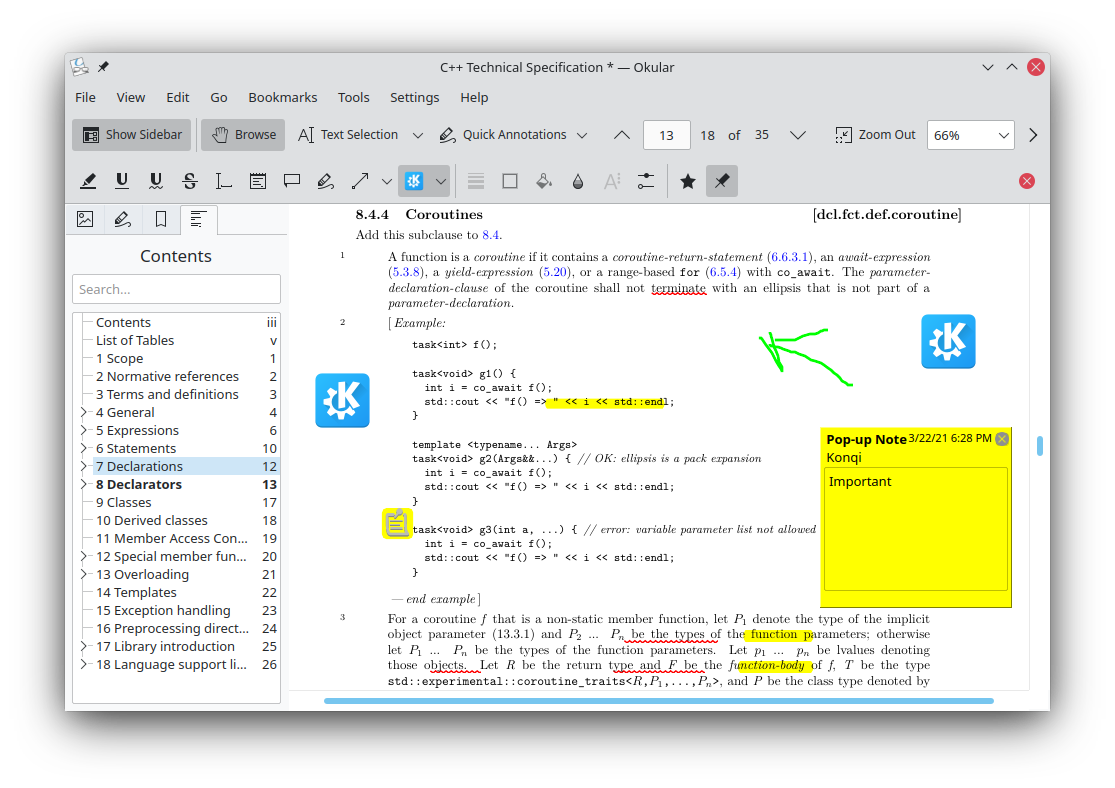
Navigating through massive textbooks or complex corporate reports can be daunting. The Okular document viewer simplifies this with a highly functional sidebar that aggregates your table of contents, page thumbnails, bookmarks, and reviews in one accessible panel. This organization allows you to jump between chapters and custom bookmarks instantly.
For power users, the robust annotation engine is a game-changer. You can easily add inline notes, highlight critical text, draw shapes, and insert reviews directly onto your documents. This makes the application an excellent companion for reviewing drafts, grading papers, or studying complex technical documentation.
Who Is This Document Viewer For?
If you are operating on Linux or other supported platforms and need a reliable, lightweight, yet feature-rich utility, this application is tailored for you. It appeals directly to users who value open-source integrity, privacy, and system efficiency. Unlike proprietary alternatives, it does not track your reading habits or interrupt your workflow with upsells.
Get Started with Okular
Whether you are analyzing complex schematics or curling up with an e-book, this software offers the flexibility and performance required for modern document management. To explore its capabilities firsthand and add this versatile tool to your workstation, visit the official Okular page on Flathub to learn more about installation options for your system.